Streamline Your Travel with Defense Travel System: The Ultimate Guide
How the Defense Travel System works for US military personnel — booking, authorizations, vouchers and reimbursement.
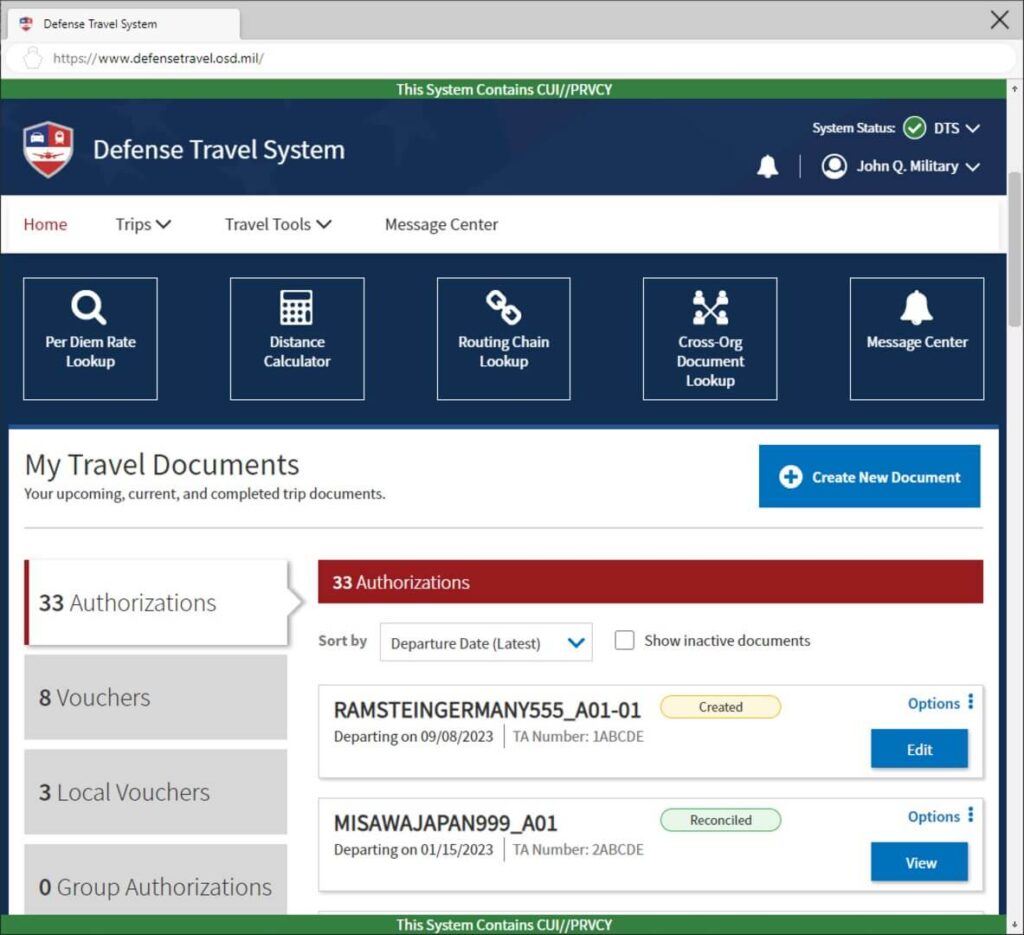
- DTS is the official travel booking system for US Department of Defense personnel.
- All official travel must be authorised through DTS before booking.
- The system handles flights, lodging and rental cars in one platform.
- Vouchers and reimbursements are processed through DTS after travel.
Managing official travel for the Department of Defense can be a complex and time-consuming task. Fortunately, the Defense Travel System (DTS) provides a streamlined and efficient solution for all your travel needs. In this comprehensive guide, we will walk you through everything you need to know about DTS, from its core features to the step-by-step process of booking and managing your trips.
Whether you are a seasoned traveler or new to the system, this guide will help you navigate DTS with confidence and ease.
By understanding how DTS works, you can save time, reduce paperwork, and focus on what matters most: your mission.
What is DTS?
The Defense Travel System is the Department of Defense’s official web-based travel management system. It is designed to automate and standardize the entire travel process for DoD personnel. From authorizations to reservations to voucher processing, DTS handles it all.
DTS replaces the old manual paper-based travel processes with a centralized digital platform. This means fewer errors, faster reimbursements, and greater transparency at every stage of your trip.
The system integrates with airline, hotel, and car rental booking channels to provide a seamless reservation experience. It also connects with accounting and payroll systems to ensure accurate and timely payments.
DTS is used by all branches of the military, DoD civilians, and authorized contractors. It serves millions of travelers each year across thousands of locations worldwide.
Understanding the fundamentals of the system is the first step toward mastering your travel workflow.
The platform is accessible from any government computer or authorized personal device with internet access and the proper credentials.
Features
DTS comes packed with a wide range of features designed to make travel management as simple as possible. One of the most important features is the ability to create travel authorizations that outline the purpose, itinerary, and estimated costs of your trip before you depart.
The system also offers an integrated booking tool that allows you to search for and reserve flights, hotels, and rental cars. You can compare options side by side and choose the most cost-effective and mission-appropriate solution.
Another key feature is the automated voucher processing system. After your trip, DTS generates a travel voucher based on your authorization and receipts, simplifying the reimbursement process significantly.
DTS also includes a robust approval workflow. Supervisors and authorizing officials can review, approve, or return documents with comments, all within the system.
Additional features include per diem calculation, split disbursement options, and integration with the Government Travel Charge Card (GTCC) program.
The system also provides detailed reporting capabilities, allowing organizations to track travel spending and compliance at the unit, command, and departmental levels.
Security is a cornerstone of the DTS platform. The system uses multi-factor authentication and encryption to protect sensitive traveler information.
Finally, DTS includes a knowledge base and help desk support to assist users with questions and troubleshooting at any stage of the travel process.
Log In
Logging into DTS requires a valid Common Access Card (CAC) or a Personal Identity Verification (PIV) card. These smart cards provide the secure authentication needed to access the system.
To begin, insert your CAC into your card reader and navigate to the DTS login page. The system will prompt you to select your certificate and enter your PIN. Once authenticated, you will be directed to the DTS home dashboard.
For users without a CAC reader, DTS also supports External Certificate Authority (ECA) certificates for authorized personnel. This allows certain contractors and non-military users to access the system remotely.
If you encounter issues during login, the DTS help desk provides telephone and email support. Many issues can be resolved by clearing your browser cache, using the correct certificate, or updating your Java settings.
It is important to always log out of DTS when you finish your session, especially when using a shared or government computer. This protects your personal and financial information.
Once logged in, you will see a customizable dashboard that displays pending tasks, recent trips, and important announcements from your organization.
Your DTS profile can also be accessed from the dashboard, where you can update your contact information, GTCC details, and mailing address at any time.
Booking
Booking travel through DTS is a straightforward process that begins with creating a travel authorization. This document captures the purpose of your trip, your itinerary, and estimated costs.
Once your authorization is approved, you can proceed to book your transportation and lodging. DTS uses the Defense Travel System Booking Tool to search for available flights, hotels, and rental cars that comply with the Joint Travel Regulations (JTR).
The booking tool prioritizes government rates and contract carriers, ensuring that your travel is both cost-effective and compliant with DoD policy. You can filter results by price, departure time, airline preference, and other criteria.
When you select a reservation, it is automatically added to your authorization. This reduces data entry and ensures consistency between your planned itinerary and your actual bookings.
DTS also allows you to book ancillary services such as baggage fees, seat selection, and travel insurance where applicable. These costs are factored into your total estimated trip cost.
For travelers who need to book outside the system, DTS supports split bookings and manual reservation entry. However, using the integrated booking tool is always preferred for compliance and tracking purposes.
After your bookings are confirmed, you can review the complete trip summary before submitting your authorization for final approval.
Gathering Info
Before you begin any DTS travel document, it is essential to gather all the necessary information. This includes your travel dates, destination, purpose of travel, and any supporting documentation such as conference approvals or training requests.
You will also need your Government Travel Charge Card (GTCC) information if you plan to use it for expenses. Make sure your card is activated and has sufficient credit limit for the trip.
If you are traveling to a location that requires a passport or visa, have those documents ready. Some international travel in DTS requires additional approvals and documentation.
It is also helpful to have your organizational funding information available, including the accounting codes that will be used to pay for your travel.
Gathering receipts and expense estimates in advance can speed up the voucher process after your trip. Keep digital copies of all receipts for lodging, transportation, and miscellaneous expenses.
For recurring trips, check whether a previous authorization can be used as a template. DTS allows you to copy an existing authorization, which saves time and reduces data entry errors.
Finally, review your organization’s local travel policies and any applicable special instructions before creating your document.
Updating Profile
Keeping your DTS profile up to date is crucial for smooth travel processing. Your profile stores your personal information, contact details, GTCC data, and mailing address.
To update your profile, log into DTS and navigate to the Profile section from the main dashboard. Here you can edit your home and work addresses, phone numbers, and email contacts.
It is especially important to verify that your GTCC information is correct. Errors in card number or expiration date can cause payment issues and delays in reimbursement.
Your profile also contains your organizational affiliations and supervisory chain. If you have recently changed units or gained a new supervisor, update these fields promptly.
Travel preferences such as preferred airlines, seat preferences, and hotel chains can also be set in your profile. These preferences help the booking tool present the most relevant options.
If you hold multiple roles or have multiple funding sources, these can be configured in your profile as well. This ensures that your authorizations route correctly through the approval chain.
Review your profile at least quarterly or whenever your personal or professional circumstances change. An accurate profile reduces the likelihood of rejected documents and delayed reimbursements.
Trip Processing
Trip processing in DTS follows a structured lifecycle. It begins with the travel authorization, which must be created, reviewed, and approved before departure.
Once the authorization is approved, the traveler can book reservations and begin travel. During the trip, it is important to keep all receipts and note any changes to the itinerary.
After the trip is complete, the traveler must create and submit a travel voucher within the required timeframe. This voucher captures actual expenses and requests reimbursement for any out-of-pocket costs.
The voucher is reviewed by the authorizing official and then processed by the financial system. Reimbursement is typically issued via direct deposit within a few business days.
Split disbursement options allow travelers to direct portions of their reimbursement to different accounts, such as paying the GTCC balance directly while receiving the remainder as a deposit.
DTS tracks the status of each document in real time. Travelers and approvers can see where a document is in the workflow and take action accordingly.
If a document is returned for corrections, DTS provides clear comments explaining what needs to be fixed. Addressing these comments promptly keeps the process moving.
Understanding the complete trip processing cycle helps travelers plan ahead and avoid common pitfalls that lead to delays.
Local Rules
In addition to the standard DTS processes, each DoD organization may have local rules and policies that affect how travel is managed. These local rules can include additional approval requirements, preferred vendors, and specific documentation needs.
Your organization’s Defense Travel Administrator (DTA) is the primary point of contact for local travel policy questions. They can provide guidance on what is required for your specific unit or command.
Common local rules include restrictions on rental car usage, limits on lodging rates, and requirements for advance ticket purchases. Some units also require pre-approval conference attendance before creating an authorization.
Local rules may also govern how travel is funded. Some organizations require specific accounting codes or have limitations on temporary duty (TDY) duration.
It is important to familiarize yourself with your organization’s local policies before initiating any travel. Ignorance of local rules can lead to disapproved authorizations and delayed reimbursements.
DTS can be configured at the local level to enforce certain rules automatically. For example, the system can be set to require additional justification for first-class travel or to limit lodging to the government rate.
Periodic training sessions and briefings are often offered by the local DTA to ensure that all travelers understand the current policies and system updates.
By staying informed about local rules and incorporating them into your DTS workflow, you can ensure a compliant and hassle-free travel experience every time.
Travelvus compares complete journeys regardless of how you booked. Government travel rates may save money but the airport, transfer and total time still matter.
Read our methodology →